

- Published at
How to Reduce Hallucinations in LLM Outputs
Table of Contents
- What Causes Hallucinations?
- 1. Write More Specific Prompts
- 2. Use Few-Shot Examples to Set the Bar
- 3. Use Prompt Constraints for Factual Tasks
- 4. Ground Responses with RAG
- 5. Use Structured Outputs to Constrain Generation
- Structured Outputs and Strict Tool Use
- 6. Validate Outputs Programmatically (or with a Second LLM Call)
- Putting It Together: A Decision Guide
Large language models are impressive, but they have a well-known problem: they make things up. They invent citations, fabricate API endpoints, state incorrect facts with total confidence, and sometimes produce outputs that sound plausible but are entirely wrong. This is called hallucination, and it is one of the most common issues developers run into when building AI-powered applications.
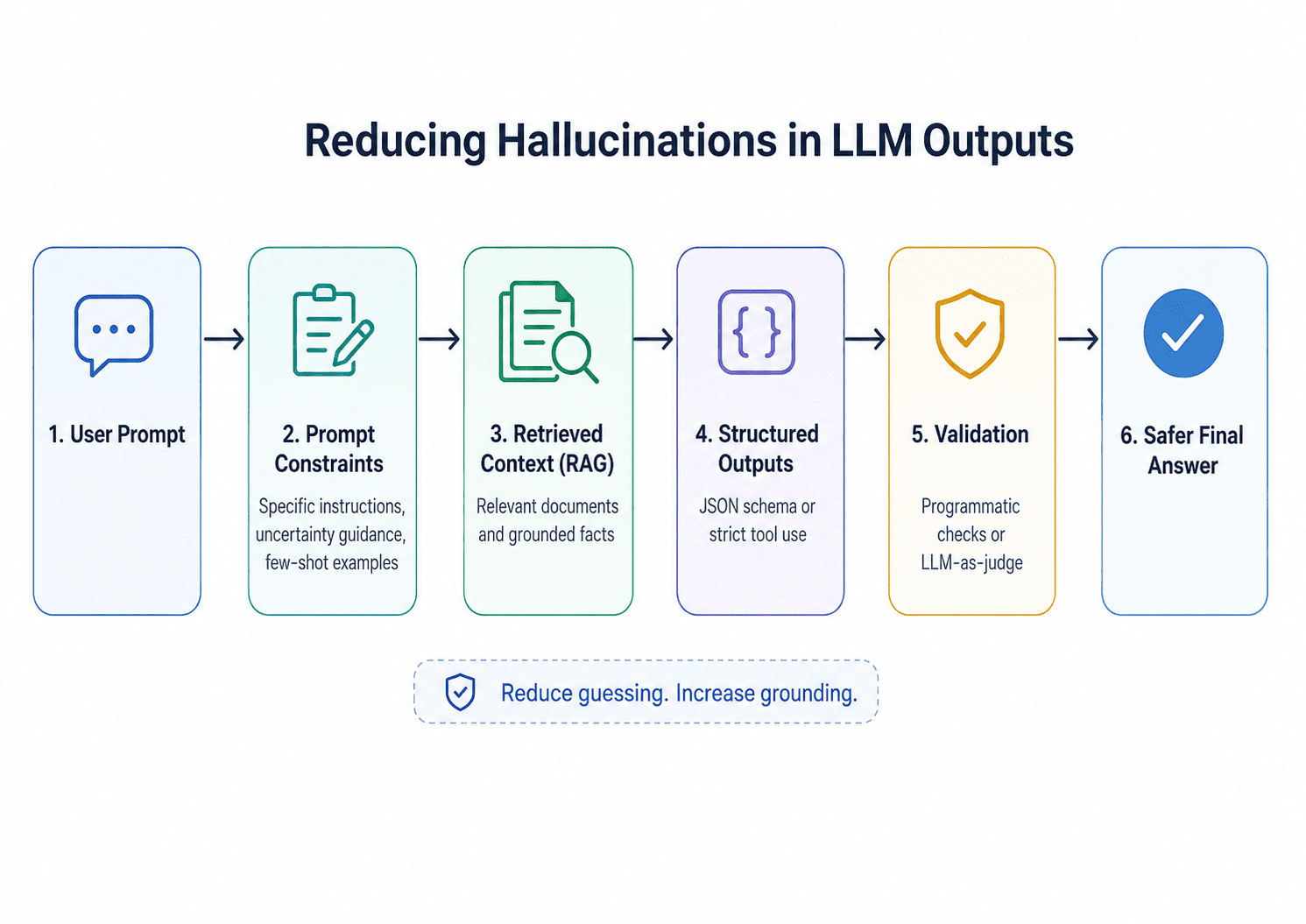
The good news is that hallucinations are not purely random. They follow patterns, and most of them can be significantly reduced — though not fully eliminated — with the right techniques applied at the right layer. This article walks through six practical approaches, with concrete examples of each.
Reducing hallucinations works best when we treat the model output as part of a controlled pipeline instead of trusting a single prompt to do everything.
What Causes Hallucinations?
Before fixing the problem, it helps to understand where it comes from.
During pretraining, LLMs learn by predicting the next token in large amounts of text. Later post-training steps make them more useful and instruction-following, but they can still produce confident falsehoods when the prompt, training data, or retrieval context rewards generating a plausible-sounding answer over admitting uncertainty. By default, a plain LLM call does not retrieve facts from a database — it generates text that resembles factual text based on patterns learned during training. When it encounters a question it does not have strong signal for, it may still generate text that looks like an answer rather than clearly expressing uncertainty — especially when the prompt or evaluation setup rewards confident answers over calibrated ones.
This means hallucinations tend to cluster around:
- Knowledge gaps — things outside the model’s training data or cutoff
- Specificity — precise details like dates, names, version numbers, or URLs
- Low-confidence domains — niche topics with sparse training data
- Long outputs — the more text the model generates, the more opportunities for drift
With that in mind, here are six techniques that address different parts of the problem.
1. Write More Specific Prompts
The single fastest way to reduce hallucinations is to remove ambiguity from your prompt. Vague instructions give the model too much creative latitude, and it fills the gaps.
Before (vague):
Tell me about React hooks.After (specific):
Explain what React hooks are and describe three commonly used hooks: useState, useEffect, and useContext.
For each hook, include: what it does, its syntax, and a one-sentence use case.
If you are unsure about any detail, say "I'm not certain about this" rather than guessing.
The second prompt does three things the first does not: it scopes the topic, specifies the output structure, and explicitly gives the model permission to express uncertainty. That last part is important. Models are trained on text that is mostly confident and declarative, so they default to sounding certain. Telling the model it is acceptable — even expected — to say “I don’t know” surfaces genuine uncertainty rather than burying it under a confident-sounding wrong answer.
You can make this instruction a standing part of your system prompt:
If you don't know something or aren't confident in a detail, say so explicitly.
Never invent facts, statistics, URLs, or citations to fill a gap.
2. Use Few-Shot Examples to Set the Bar
Few-shot prompting lets you show the model what a good (and bad) response looks like. This is especially useful when you need the model to express calibrated uncertainty rather than fake confidence.
Example — without few-shot:
User: What is the exact population of Tokyo as of today?Without examples, the model will typically produce a confident-sounding answer:
The population of Tokyo is approximately 13.96 million in the city proper,
or around 37.4 million in the greater metropolitan area.
This sounds authoritative, but it is a static figure from training data presented as if it were current. The model has no real-time data and no instruction to say so. Now add examples:
Example — with few-shot:
Answer the following questions. If you are not certain, say "I'm not sure" and explain why.

Q: What is the capital of France?
A: Paris.

Q: What is the exact population of Tokyo as of today?
A: I'm not sure of the exact current figure — population counts change constantly and I don't have real-time data. As of my training data, the greater Tokyo area had roughly 37–38 million people, but you should verify this with a current source.

Q: What is the capital of Australia?
A:
By showing the model what a good uncertain response looks like, you dramatically increase the chance it will handle real uncertain questions the same way. The pattern is learned from your examples, not just stated in the instruction.
3. Use Prompt Constraints for Factual Tasks
In older model APIs, developers often lowered the temperature parameter for factual tasks to reduce randomness. For Claude Opus 4.7 specifically, Anthropic no longer supports non-default temperature, top_p, or top_k values — passing any non-default value returns a 400 error. Other providers and older Claude models still accept these parameters, but for Claude Opus 4.7, factual behavior should be guided through prompting, grounding, and validation rather than sampling controls.
Lower temperature was always a consistency control, not a substitute for grounding or validation. A model set to temperature 0 could still produce a consistently wrong answer. The same logic applies here: prompt constraints guide factual behavior without relying on sampling parameters.
The core technique is to instruct the model to treat factual and structured tasks differently from open-ended ones, using language:
For a factual task:
import Anthropic from '@anthropic-ai/sdk';

const client = new Anthropic();

// For factual tasks: scope the question tightly and require uncertainty disclosure
const factualResponse = await client.messages.create({
  model: 'claude-opus-4-7',
  max_tokens: 1024,
  system:
    'Answer only what is asked. If you are not certain of a value, say so explicitly rather than guessing. Do not invent details.',
  messages: [
    {
      role: 'user',
      content:
        'List the HTTP status codes for: OK, Not Found, Internal Server Error, and Unauthorized.',
    },
  ],
});

// For creative tasks: give the model latitude
const creativeResponse = await client.messages.create({
  model: 'claude-opus-4-7',
  max_tokens: 1024,
  messages: [
    {
      role: 'user',
      content:
        'Write a short story opening about a developer who discovers a bug in production.',
    },
  ],
});
A practical rule of thumb: for anything with a definitively correct answer, constrain it with a system prompt that scopes the task and requires uncertainty disclosure. Use open-ended prompts only when variety matters more than factual precision.
4. Ground Responses with RAG
Retrieval-Augmented Generation (RAG) is one of the most effective techniques for reducing hallucinations that stem from knowledge gaps. Instead of relying on what the model learned during training, you retrieve relevant documents and include them directly in the prompt context. The model then answers based on that retrieved content rather than generating from memory.
This is especially valuable for:
- Internal knowledge bases (company docs, product manuals)
- Up-to-date information the model could not have been trained on
- Domain-specific content with high precision requirements
Conceptual flow:
User question
      ↓
Embed the question as a vector
      ↓
Search a vector database for similar chunks
      ↓
Insert retrieved chunks into the prompt
      ↓
Model answers from the retrieved context
One often-overlooked factor here is chunking strategy. If your documents are split into chunks that are too large, the retrieved context becomes noisy and the model may anchor on irrelevant parts. If chunks are too small, they lose surrounding context and produce incomplete answers. Both failure modes can introduce hallucinations. A reasonable starting point is 512–1024 tokens per chunk with some overlap (e.g. 10–20%) to preserve continuity across boundaries.
A minimal RAG prompt structure:
You are a helpful assistant. Answer the user's question using only the context provided below.
If the answer is not in the context, say "I don't have enough information to answer that."

Context:
---
[Retrieved document chunks inserted here]
---

User question: {question}
The key instruction is “using only the context provided”. This encourages the model to stay within the retrieved text and reduces the chance that it will supplement gaps with invented details. Combined with an explicit fallback (“say I don’t have enough information”), this significantly reduces fabricated content.
Note that RAG reduces hallucinations from knowledge gaps but does not eliminate them entirely. Retrieval can still fail if chunks are irrelevant, the answer is missing from the index, or the model ignores the grounding instruction. For critical applications, combine RAG with the validation techniques in Section 6.
Node.js example with a simple in-memory context:
import Anthropic from '@anthropic-ai/sdk';

const client = new Anthropic();

// In a real RAG system, this context would be retrieved from a vector database
const retrievedContext = `
  The Anthropic Messages API accepts the following parameters:
  - model (required): The model ID to use, e.g. "claude-opus-4-7"
  - max_tokens (required): Maximum number of tokens to generate
  - messages (required): Array of message objects with role and content
  - output_config (optional): Controls output format, e.g. structured outputs
  - system (optional): System prompt string
`;

async function answerWithContext(question) {
  const response = await client.messages.create({
    model: 'claude-opus-4-7',
    max_tokens: 512,
    system: `You are a helpful assistant. Answer questions using only the context provided.
If the answer is not in the context, say "I don't have enough information to answer that."`,
    messages: [
      {
        role: 'user',
        content: `Context:\n---\n${retrievedContext}\n---\n\nQuestion: ${question}`,
      },
    ],
  });

  return response.content[0].text;
}

const answer = await answerWithContext(
  'What parameters are required when calling the Messages API?',
);
console.log(answer);
This approach gives the model less room to answer from unsupported memory by providing authoritative source material and an explicit instruction to stay within it.
A note on citations: For user-facing factual answers, return citations tied to the actual retrieved chunks so users can inspect the source. Do not ask the model to invent citations — citations should come from the retrieved documents themselves, not from the model’s memory. Anthropic’s API supports document-based citations, but note that citations are incompatible with output_config.format structured JSON outputs and will return a 400 error if combined. If you need both grounded citations and structured output in the same response, you will need to handle them in separate calls or return source IDs, URLs, or retrieved chunk references as fields within your schema.
5. Use Structured Outputs to Constrain Generation
Hallucinations thrive in free-form text generation. When a model is generating unstructured prose, it has unlimited latitude to insert invented details. Constraining the output to a schema — like JSON — reduces that latitude considerably.
When you constrain a model to a schema, it cannot easily sneak in hallucinated free text. Each field has to fit the schema, and the structural constraint keeps the model focused. That said, structured outputs reduce format drift and make uncertainty easier to represent — they do not make unknown facts true. A model can still return a perfectly schema-valid JSON object with a confidently wrong value if it has no grounding data. Use structured outputs alongside retrieval or validation, not instead of them.
Instead of this:
Describe the user's account status and any recent activity.Try this:
Return a JSON object with the following fields:
- account_status: one of "active", "suspended", or "pending"
- last_login_date: ISO 8601 date string, or null if unknown
- has_outstanding_issues: boolean
- confidence: one of "high", "medium", or "low"

If you are not certain about a value, set confidence to "low" and use null for uncertain fields.
Only return the JSON object, no other text.
Response with structure:
{
  "account_status": "active",
  "last_login_date": null,
  "has_outstanding_issues": false,
  "confidence": "low"
}
The output format now gives the model a clear place to represent its uncertainty (via the confidence field) and use null for unknown values rather than inventing plausible-sounding ones. This makes hallucinations both less likely and more detectable when they do occur.
One important caveat: a model-generated confidence field is not a calibrated probability. The model can be confidently wrong, and self-reported confidence should not be used as a standalone reliability signal. In production, treat it as a routing hint rather than a ground truth — combine it with evidence quality, retrieval scores, programmatic validation checks, or human review for high-stakes cases.
Structured Outputs and Strict Tool Use
Anthropic’s Structured Outputs feature goes further than prompting by using grammar-constrained decoding at the token level, making schema violations much less likely under normal completion conditions. Two modes are available:
- JSON outputs (
output_config.format): Constrains Claude’s response to a JSON schema. Use this when you want Claude’s final answer as JSON. - Strict tool use (
strict: true): Guarantees schema validation on tool inputs using the same constrained decoding pipeline. Use this when you want Claude to call a tool with schema-valid inputs.
Standard tool use (without strict: true) does not use constrained decoding and does not provide the same guarantees. To claim schema-level enforcement, you need one of the two modes above.
The following example uses strict tool use — note strict: true and additionalProperties: false, both required for schema enforcement:
import Anthropic from '@anthropic-ai/sdk';

const client = new Anthropic();

const response = await client.messages.create({
  model: 'claude-opus-4-7',
  max_tokens: 512,
  tools: [
    {
      name: 'report_account_status',
      description:
        'Report the structured account status based on available information.',
      strict: true,
      input_schema: {
        type: 'object',
        additionalProperties: false,
        properties: {
          account_status: {
            type: 'string',
            enum: ['active', 'suspended', 'pending'],
            description: 'Current account status',
          },
          last_login_date: {
            type: ['string', 'null'],
            description:
              'ISO 8601 date string of last login, or null if unknown',
          },
          has_outstanding_issues: {
            type: 'boolean',
            description: 'Whether there are unresolved issues on the account',
          },
          confidence: {
            type: 'string',
            enum: ['high', 'medium', 'low'],
            description: 'Confidence level in the reported values',
          },
        },
        required: [
          'account_status',
          'last_login_date',
          'has_outstanding_issues',
          'confidence',
        ],
      },
    },
  ],
  tool_choice: { type: 'tool', name: 'report_account_status' },
  messages: [
    {
      role: 'user',
      content:
        'Check the account status for user ID 9821. Last activity data is unavailable.',
    },
  ],
});

// The model returns a tool_use block with schema-validated inputs
const toolUse = response.content.find((block) => block.type === 'tool_use');
if (!toolUse) {
  throw new Error('Claude did not return a tool_use block.');
}
const accountData = toolUse.input;
console.log(accountData);
Even with strict tool use, your application still needs to handle edge cases: a refusal or a response that hits max_tokens mid-generation can still produce output that does not match the schema. Schema-constrained decoding covers the normal completion path, not exceptional conditions.
If you want Claude’s final response as JSON rather than a tool call, use output_config.format instead:
import Anthropic from '@anthropic-ai/sdk';

const client = new Anthropic();

const response = await client.messages.create({
  model: 'claude-opus-4-7',
  max_tokens: 512,
  output_config: {
    format: {
      type: 'json_schema',
      schema: {
        type: 'object',
        additionalProperties: false,
        properties: {
          account_status: {
            type: 'string',
            enum: ['active', 'suspended', 'pending'],
          },
          last_login_date: { type: ['string', 'null'] },
          has_outstanding_issues: { type: 'boolean' },
          confidence: { type: 'string', enum: ['high', 'medium', 'low'] },
        },
        required: [
          'account_status',
          'last_login_date',
          'has_outstanding_issues',
          'confidence',
        ],
      },
    },
  },
  messages: [
    {
      role: 'user',
      content:
        'Check the account status for user ID 9821. Last activity data is unavailable.',
    },
  ],
});

const result = JSON.parse(response.content[0].text);
console.log(result);
6. Validate Outputs Programmatically (or with a Second LLM Call)
No prompt technique eliminates hallucinations entirely. For high-stakes applications, you need a validation layer on top of your prompts.
Programmatic validation works well for structured outputs where you can check specific properties:
function validateLLMResponse(response) {
  const errors = [];

  // Check that required fields exist
  if (!response.account_status) {
    errors.push('Missing account_status');
  }

  // Check that enum values are valid
  const validStatuses = ['active', 'suspended', 'pending'];
  if (!validStatuses.includes(response.account_status)) {
    errors.push(`Invalid account_status: ${response.account_status}`);
  }

  // Check date format if present
  if (response.last_login_date !== null) {
    const isValidDate = !isNaN(Date.parse(response.last_login_date));
    if (!isValidDate) {
      errors.push(`Invalid date format: ${response.last_login_date}`);
    }
  }

  return { valid: errors.length === 0, errors };
}
LLM-as-judge validation is useful when you cannot programmatically verify correctness — for example, when validating that a summary accurately reflects a source document:
import Anthropic from '@anthropic-ai/sdk';

async function validateWithLLM(originalDocument, summary) {
  const client = new Anthropic();

  const response = await client.messages.create({
    model: 'claude-opus-4-7',
    max_tokens: 256,
    messages: [
      {
        role: 'user',
        content: `
You are a fact-checker. Compare the summary below against the original document.
Return a JSON object with:
- accurate: boolean (true if the summary contains no factual errors)
- issues: array of strings describing any inaccuracies found (empty array if none)

Original document:
${originalDocument}

Summary to check:
${summary}

Return only the JSON object.`,
      },
    ],
  });

  const raw = response.content[0].text.replace(/```json|```/g, '').trim();

  try {
    return JSON.parse(raw);
  } catch {
    // The validator itself can occasionally return malformed output.
    // Treat parse failures as inconclusive rather than crashing.
    console.error('Validation response could not be parsed:', raw);
    return {
      accurate: null,
      issues: ['Validation failed: could not parse checker response'],
    };
  }
}
This pattern — using one LLM call to generate content and a second to verify it — is sometimes called a generator-critic approach, drawn from the broader literature on LLM self-refinement and evaluation. It adds latency and cost, but for content where errors carry real consequences, the tradeoff is often worth it.
In production, prefer using output_config.format with a JSON schema for the validator response rather than asking for JSON in plain text and stripping Markdown fences. The example above uses string replacement for simplicity, but structured outputs make the validator more reliable and internally consistent with the approach described in Section 5.
For genuinely high-stakes applications — legal, medical, or financial — LLM-as-judge is not a sufficient final check. These domains require human review of outputs before they are acted on. Use LLM-as-judge as a filter to catch obvious errors early in the pipeline, not as a substitute for expert validation.
Putting It Together: A Decision Guide
Not every application needs all six techniques. Here is a practical starting point:
| Situation | Start with |
|---|---|
| Factual Q&A with no live data | Specific prompts + explicit uncertainty instruction |
| Q&A over internal documents | RAG with a “context only” prompt |
| Structured data extraction | Strict structured outputs + programmatic validation |
| Summarization of provided text | Few-shot examples + LLM-as-judge validation |
| General-purpose chatbot | Specific system prompt + uncertainty instruction |
| High-stakes content (legal, medical) | RAG + source citations + programmatic validation + human review |
The most common mistake is treating hallucinations as a single problem with a single fix. In practice, a factual Q&A bot has a different root cause than a summarization tool, and they need different solutions. Diagnosing where the hallucination is coming from — knowledge gaps, underspecified prompts, free-form generation — points you directly to the right technique.
Start with the simplest fix (better prompts) before reaching for the more complex ones (RAG, validation pipelines). You will often be surprised how far a specific, well-structured prompt with an explicit uncertainty instruction takes you.
Measure whether it is working. None of these techniques replace evaluating whether they are actually reducing hallucinations in your specific application. Build a small test set of real user questions — including questions where the correct answer is not in the retrieved context — and check whether the model says “I don’t have enough information” rather than guessing. Track failure categories: unsupported claims, wrong dates or version numbers, schema-valid but factually wrong values, and missing uncertainty signals. Re-run the evaluation whenever you change prompts, chunking strategy, retrieval settings, model version, or structured output schemas. Hallucination reduction is an ongoing process, not a one-time configuration.