

- Published at
How to Handle Errors and Retries in n8n Workflows
Table of Contents
- The example: a report with optional supplementary data
- What happens without an error-handling policy?
- Recover: what retries change, and what they don’t
- A status code is only part of the decision
- Repeating an operation must be safe
- Handle: an optional failure needs a visible fallback
- Preserve the report and describe what is missing
- Escalate: some failures should stop the workflow
- An Error Workflow surfaces failures that remain unhandled
- Why manual execution did not exercise the handler
- Both deliberate and technical failures reached the handler
- Retrying a node is different from replaying a failed execution
- Choosing the right response
An API request fails halfway through a workflow. Should the workflow try again, continue without the response, or stop?
The answer depends on what the operation does and what the workflow needs to accomplish. An optional lookup can fail while the main result remains useful. Missing required input may invalidate that result before any API request is made. Treating both situations the same way either stops useful work unnecessarily or lets invalid work appear successful.
In n8n, I approach this through three decisions:
- Recover: retry an operation when another attempt could succeed safely.
- Handle: capture a non-critical failure and continue with an explicit fallback.
- Escalate: stop when the workflow cannot produce a valid result, then surface the failure through an Error Workflow.
To explore those decisions, I tested a small report workflow using Retry On Fail, error-output routing, Stop And Error, and Error Trigger. The examples below explain what each mechanism changed and where its responsibility ends.
The companion files are Errors and Retries Demo and Report Error Handler. The main workflow is saved with a valid report, /status/503, retries enabled, and the connected fallback branch. After import, the handler needs to be selected in the main workflow’s Error Workflow setting because that account-specific reference is intentionally omitted from the export. The files contain the workflow definitions, without the original execution history.
The example: a report with optional supplementary data
The workflow starts with a fixed report:
{
  "reportId": "report-001",
  "title": "Weekly activity report",
  "summary": "12 support tickets resolved this week."
}
The report needs a title, but it can remain useful without supplementary data from an external service. That gives us two distinct failure policies: reject a report with no title, and allow an optional lookup to fail without losing the report.
The main workflow has eight nodes, including separate manual and webhook triggers. Its responsibilities are small:
| Node | Responsibility |
|---|---|
| Prepare Report | Supplies the report’s ID, title, and summary |
| Has Report Title | Checks whether the required title is present |
| Reject Invalid Report | Deliberately fails an invalid report |
| Fetch Supplementary Data | Makes the optional HTTP request |
| Record Lookup Failure | Captures an unsuccessful lookup |
| Mark Completed | Produces the final report with an explicit supplementary-data status |
A separate two-node workflow, Report Error Handler, receives unhandled failures and formats their details.
The HTTP requests use httpbin.org: /status/503 and /status/400 deliberately return failures, while /get returns request information as a successful JSON response. This is a stand-in for an enrichment API, not a source of real report data.
Testing began on official n8n Cloud 2.39.4. The screenshots show stages of the workflow as I explored its behavior, so earlier screenshots contain fewer nodes.
What happens without an error-handling policy?
The baseline was a three-node path: a Manual Trigger, Fetch Supplementary Data, and Mark Completed. The HTTP node requested https://httpbin.org/status/503, with retries disabled and On Error set to Stop Workflow.
The HTTP request failed, the execution was marked as an error, and Mark Completed did not run. The node displayed a service-unavailable message followed by:
503 - ""The empty quotes reflect the empty response body. The status code still identifies the failure. In this case, the response was deliberate; it did not indicate an n8n Cloud outage.
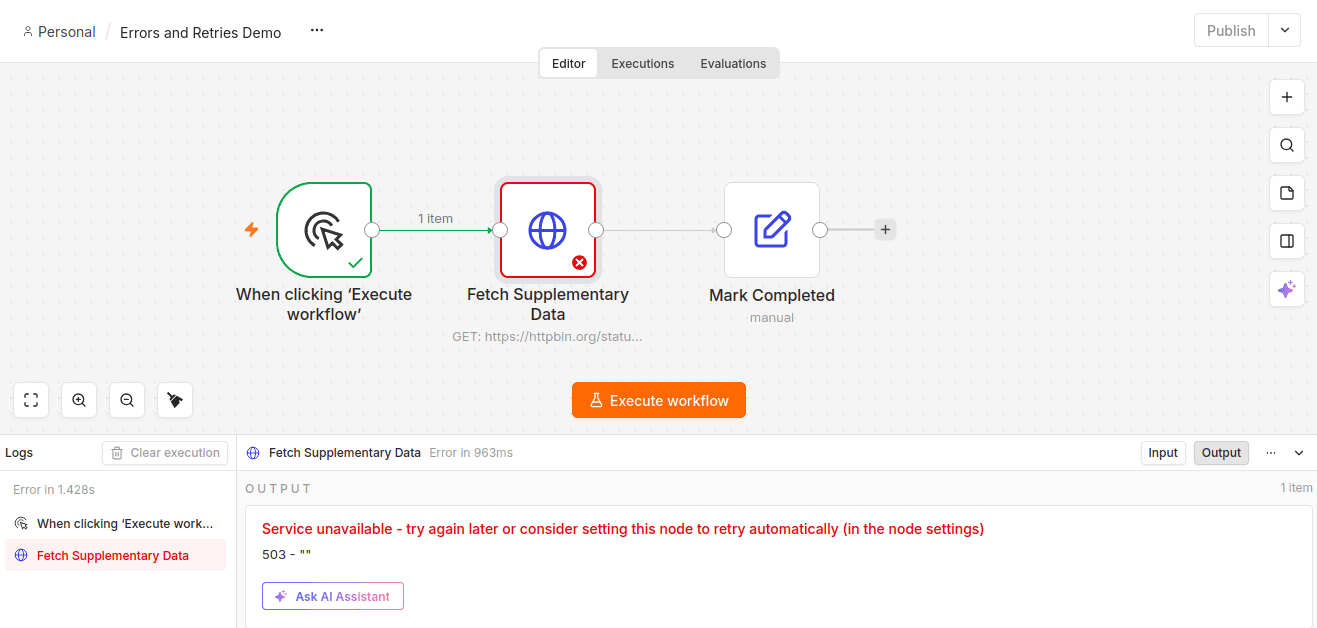
With Stop Workflow, the failed request prevents the downstream node from executing.
This is appropriate when downstream work requires the request to succeed. It is too strict for our optional lookup, but it establishes the behavior that retries and local handling will change.
The HTTP node’s Never Error option remained off throughout these tests. As the HTTP Request documentation explains, enabling it treats HTTP responses as successful regardless of their status code. That can be useful when a workflow explicitly branches on response statuses, but it would change the failure behavior being examined here.
Recover: what retries change, and what they don’t
For the next run, Fetch Supplementary Data had Retry On Fail enabled, Max Tries set to 3, and Wait Between Tries set to 2000 ms. On Error remained Stop Workflow.
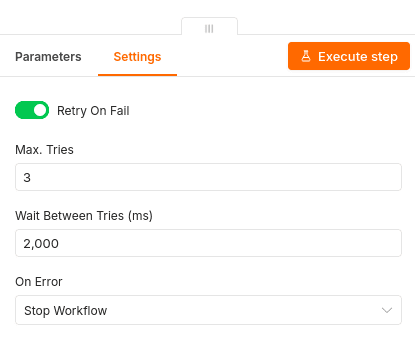
Three total attempts, with a two-second wait between attempts.
Max Tries counts the initial attempt. A value of three therefore allows the initial attempt plus two retries.
The workflow still failed, and Mark Completed still did not run. The overall duration increased from about 1.4 seconds in the baseline to about 7.4 seconds with retries enabled. That was consistent with the added waits and request time, although elapsed time alone is not an independent count of server requests.
The endpoint consistently returns 503, so this demonstrated retry exhaustion. It did not demonstrate a temporary outage recovering. If a later attempt succeeded, the workflow could continue normally; this particular endpoint gives it no opportunity to do so.
Retries buy an operation another chance. They do not decide what the workflow should do when all attempts fail. That is the role of the failure policy that follows them.
A status code is only part of the decision
I repeated the experiment against /status/400 with the same retry configuration. The node again spent several seconds attempting the operation before the workflow failed, this time with a bad-request message.
That result matters because enabling Retry On Fail did not create a policy that distinguished a potentially temporary 503 from a request that needed correcting. An unchanged malformed request generally gains nothing from another attempt.
The opposite shortcut, “retry all 5xx responses and never retry 4xx responses,” is also too broad. A 429 may call for retrying after a delay. An API may document particular conflicts as retryable. The operation, the response, and the service’s guidance all matter.
If the service supplies Retry-After, that should influence the delay. The demo’s fixed two-second wait does not dynamically implement that header or exponential backoff.
Repeating an operation must be safe
Our test performs a read-only GET. Repeating a write needs more care.
Suppose a payment request succeeds, but its response is lost. n8n sees a failure and retries; the customer could be charged twice. The same ambiguity can arise when sending an email or creating an order.
Idempotency means repeated attempts have the same intended effect as one attempt. Where an API supports idempotency keys, reusing a stable key for the same logical operation can help prevent duplicate effects. The API’s semantics should determine whether and how a request is retried.
Handle: an optional failure needs a visible fallback
The report’s title and summary already exist before the supplementary request. If the lookup remains unavailable, those fields still form a useful result.
For this case, Fetch Supplementary Data uses On Error > Continue (using error output). Its success output connects directly to Mark Completed. Its error output passes through Record Lookup Failure before reaching Mark Completed.
These are alternative paths for the single report. There is no need to wait for both branches or merge two results.
The node settings documentation describes three On Error choices:
| Option | Consequence |
|---|---|
| Stop Workflow | An unhandled node failure stops the execution |
| Continue | Execution continues through the regular output |
| Continue (using error output) | Failure data is routed through a separate output |
I used the separate error output because it makes the fallback visible on the canvas and gives it its own data transformation. Plain Continue was not part of these tests.
Retries remained enabled. When the request kept returning 503, the node exhausted its attempts and then sent an item down the error branch. Record Lookup Failure and Mark Completed both ran, and the workflow succeeded.
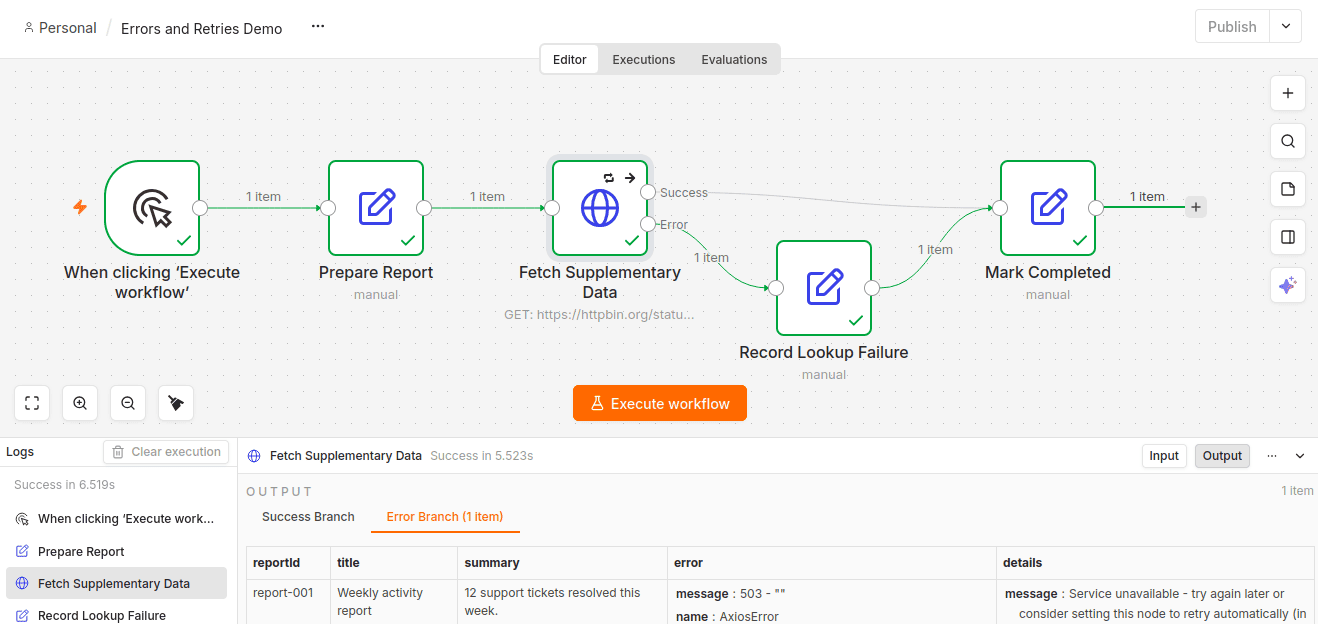
The request returned 503, but the workflow completed through its fallback path.
One potentially confusing detail is the green HTTP node. In the handled run, n8n displayed it as successful even though the request had failed and its item had traveled through the Error output. A green execution status does not, by itself, prove that the API request succeeded.
Preserve the report and describe what is missing
Record Lookup Failure produces a small record containing the original report fields, supplementaryStatus: "unavailable", an error message, and the HTTP status.
The tested error output supplied the message at error.message and the status at error.response.status. The relevant mappings were:
| Output field | Expression | Type |
|---|---|---|
lookupErrorMessage | {{ $json.error.message }} | String |
lookupHttpStatus | {{ $json.error.response.status }} | Number |
These paths describe the HTTP-response failures observed here. A timeout or DNS failure may have no response object, so the status mapping would need to accommodate that when adapting the workflow.
The report fields come from Prepare Report rather than depending on the HTTP response to preserve them. For example:
{
  {
    $('Prepare Report').first().json.reportId;
  }
}
This workflow processes one report per execution. The use of .first() is appropriate for that scope; it should not be carried into a batch workflow without considering how each output relates to its original report.
Mark Completed produces a consistent result from either branch. On failure, it retains the report and the error information while returning an empty supplementary-data object:
[
  {
    "result": "Reached the final node",
    "reportId": "report-001",
    "title": "Weekly activity report",
    "summary": "12 support tickets resolved this week.",
    "supplementaryStatus": "unavailable",
    "supplementaryData": {},
    "lookupErrorMessage": "503 - \"\"",
    "lookupHttpStatus": 503
  }
]
On the successful /get run, Record Lookup Failure was skipped. The final result contained supplementaryStatus: "available", the response body in supplementaryData, and an empty error message.
The demo defaults the successful status field to 200, matching its known /get response. That is not a captured response status. A real API with several possible success codes should use Include Response Headers and Status and map the status from that response structure.
The important property is that consumers can distinguish available enrichment from missing enrichment. Continuing is justified because the report remains valid, and the output records exactly what was lost.
Escalate: some failures should stop the workflow
A missing title is different from missing supplementary data. In this example, a title is part of the report’s required structure. Continuing would produce an invalid report.
The Has Report Title If node evaluates:
{
  {
    ($json.title ?? '').trim();
  }
}
It uses the String is not empty condition. The expression converts a missing or null title to an empty string and trims surrounding whitespace before checking it. The example assumes the title is a string when present.
A valid title leads to Fetch Supplementary Data. An empty title leads to Reject Invalid Report, a Stop And Error node configured with this error message:
Report validation failed: title is required.With the title cleared, the workflow took the false branch and failed with that message. The HTTP request, the lookup-failure branch, and Mark Completed did not run.
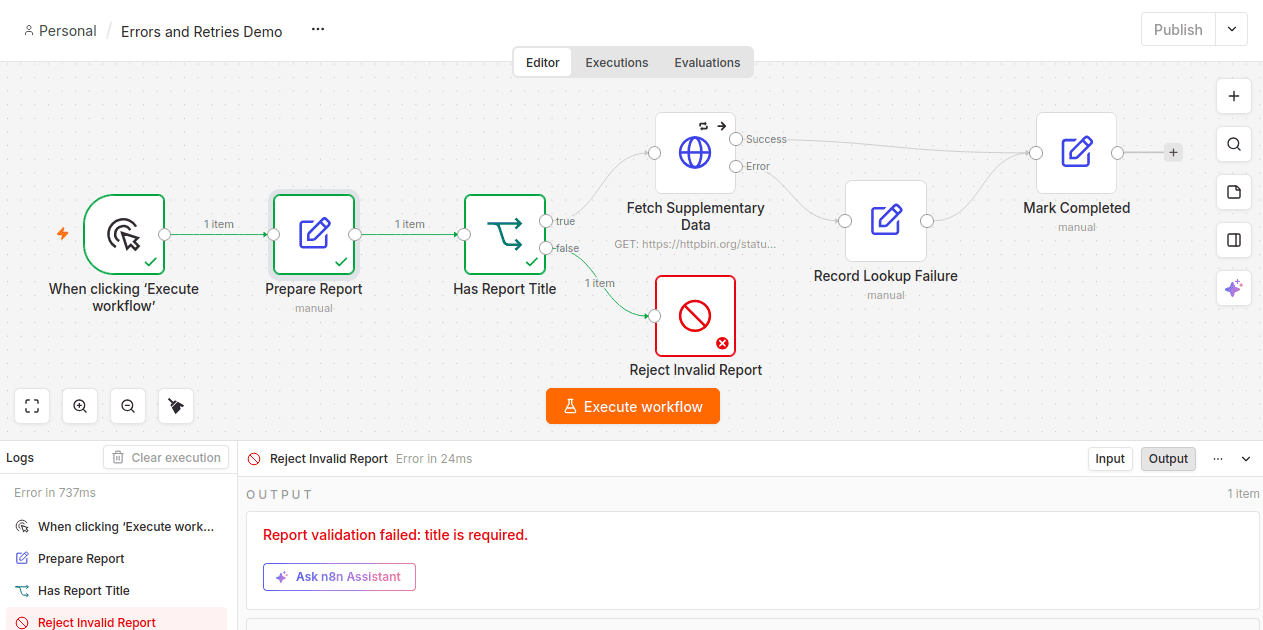
A validation failure stops the workflow before the supplementary lookup.
No external service had thrown an exception. The workflow itself determined that it could not produce an acceptable result.
That is the value of Stop And Error: it makes a business or validation failure an execution failure. Simply ending the false branch would not express that outcome as clearly and could leave the execution marked successful.
Retrying this validation failure would not fix the report. The input needs to change.
An Error Workflow surfaces failures that remain unhandled
Local handling lets a workflow produce a valid result despite a failed operation. An Error Workflow deals with an execution that has failed.
The example’s Report Error Handler contains just Error Trigger followed by Format Failure, an Edit Fields node. The main workflow references it through its Error Workflow setting.
Format Failure extracts the context needed to investigate:
| Field | Source expression |
|---|---|
workflowName | {{ $json.workflow.name }} |
failedNode | {{ $json.execution.lastNodeExecuted }} |
errorMessage | {{ $json.execution.error.message }} |
executionId | {{ $json.execution.id }} |
executionUrl | {{ $json.execution.url }} |
For the missing-title failure, the output identified Errors and Retries Demo, Reject Invalid Report, and the validation message. The execution ID and URL linked the record to the failed main execution.
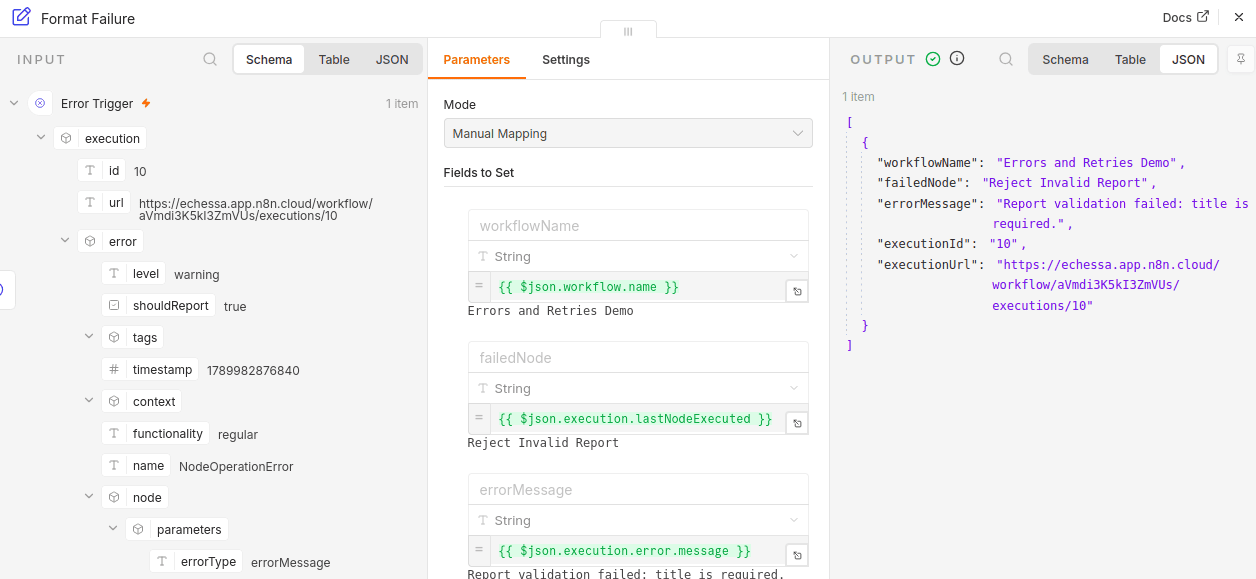
The handler successfully records a failed main execution. Its success does not change the original failure.
The handler only formats data for inspection. It does not send an alert automatically. A production handler could pass the same record to a notification or incident-management service.
These expressions cover the downstream node failures tested here. The Error Trigger documentation describes a different payload for trigger failures, and execution IDs and URLs depend on the failed execution being saved.
Why manual execution did not exercise the handler
Error Trigger does not run when the parent workflow is executed manually. To test it, the main workflow also has a GET Webhook trigger named Run Report, feeding the same report path as the Manual Trigger.
The automatic tests used the published workflow’s Production URL. Because the webhook responds immediately, its browser acknowledgement only confirms receipt; the execution records reveal whether report processing succeeded.
Publication also mattered in the Cloud interface used for these tests. Report Error Handler initially appeared disabled in the Error Workflow dropdown with a “Not published” tooltip. Publishing it made it selectable. The documentation reviewed for the original tests said publication was unnecessary, so the behavior described here reflects the observed Cloud interface.
The main workflow’s production runs also needed the intended changes published. Autosaving an editor change and publishing the version used by the production trigger are distinct actions.
Both deliberate and technical failures reached the handler
The missing-title test produced a failed main execution and a successful handler execution containing the validation details.
I also tested a valid report with the HTTP node temporarily set to Stop Workflow, while keeping /status/503 and retries enabled. This treated the lookup as required for the purpose of the experiment. Once the attempts were exhausted, the main workflow failed. A new handler execution identified Fetch Supplementary Data and the service-unavailable error.
Restoring Continue (using error output) restored the optional-lookup policy. The final behavior was:
| Situation | Main workflow outcome | New Error Workflow execution? |
|---|---|---|
| Valid report and successful lookup | Succeeded with supplementary data | No |
| Valid report and handled 503 | Succeeded with supplementary data marked unavailable | No |
| Missing title | Failed at Reject Invalid Report | Yes, when triggered automatically |
| HTTP failure after retries, with Stop Workflow | Failed at Fetch Supplementary Data | Yes, when triggered automatically |
The handler does not resume failed work or convert a failed execution into a successful one. Its successful status means that it processed the failure information successfully.
When inspecting these runs, the handler’s timestamp and its executionId matter more than the mere presence of a handler execution. An older handler run can describe an earlier failure even when the latest main run succeeded.
Retrying a node is different from replaying a failed execution
Retry On Fail operates during the current workflow execution. Retrying a failed execution is a later recovery action against a saved execution record.
The execution documentation describes Retry with original workflow and Retry with currently saved workflow. Both use previous execution data; the latter allows workflow changes to be applied.
Execution replay was not part of the hands-on tests described here. These node-retry results therefore do not establish which nodes would run again during a replay.
That distinction matters when earlier operations have already produced side effects. Before replaying work that sends messages or creates orders, the recovery plan needs to account for completed actions and prevent duplicates.
Choosing the right response
The four mechanisms have separate responsibilities:
| Mechanism | Decision it implements |
|---|---|
| Retry On Fail | Give a potentially recoverable operation another attempt |
| On Error with an error output | Handle a failure locally and continue intentionally |
| Stop And Error | Declare that workflow logic has found an unacceptable result |
| Error Workflow and Error Trigger | Surface an execution failure for investigation or escalation |
They can work together. The optional lookup first gets a limited opportunity to recover, then falls back to a report with unavailable enrichment. A missing title stops immediately. A required operation that remains unsuccessful stops after its retry budget is exhausted and reaches the error handler.
The key question is whether the workflow can still deliver a valid result. That decision should determine the error policy, and the output should make the outcome visible.